How to Change IB broker Exness
Please note, once your IB transfer request is approved, please create a new trading account in Exness member area as only trading accounts created after IB transfer will be connected to our IB. Then validate the new trading account in our member area.
To move IB Exness account, please follow these steps:
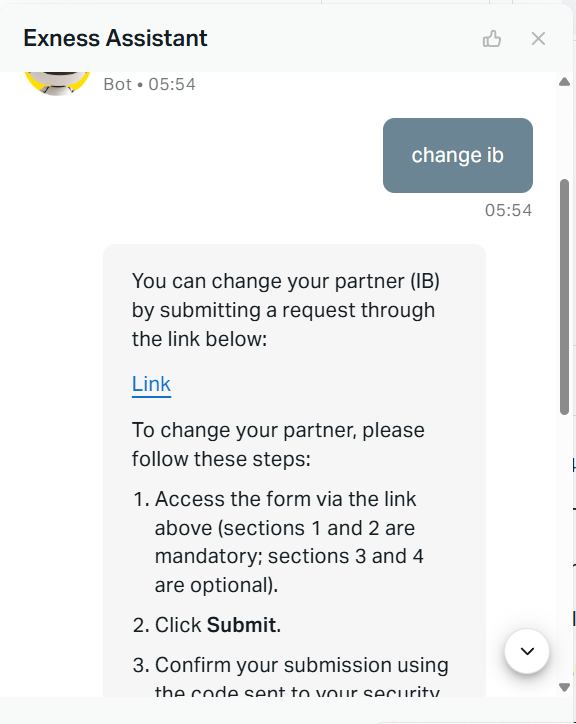
- Log in to the Exness member area (personal area), then click the chat button at the bottom right, in the chat window type "Change IB", then the chat bot will respond to you regarding how to change IB as shown in the following image:
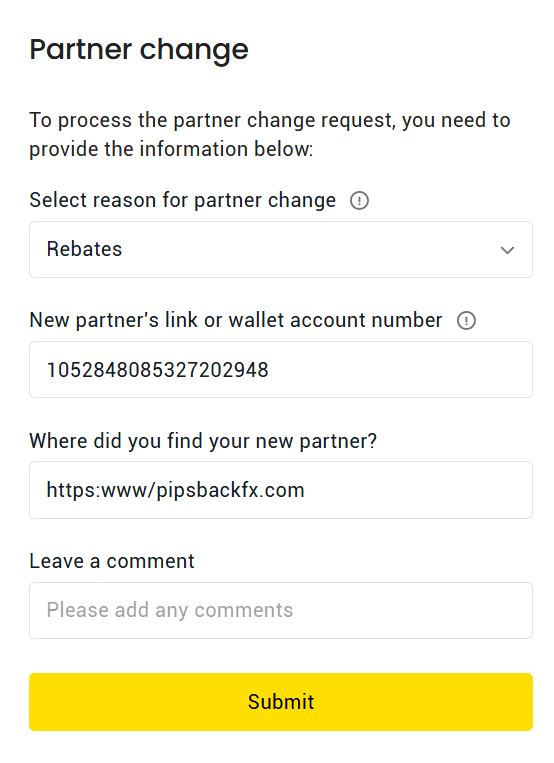
- Click on the "Link" and you will get an IB transfer request form, then enter our IB Wallet account in the form, namely: 1052848085327202948 and fill in the other fields as shown in the following image:
- Once you receive notification that you've successfully moved your IB, create a new trading account in the Exness member area, as the IB's member area (personal area) has been moved. Trading accounts created before the IB move cannot be transferred (they remain with the old IB or be without an IB). All trading accounts created after the IB move will be attached under our IB.
- Add to validate the new trading account you created after moving IB in the MyPisbackFX member area